Overview
DocAnax provides three complementary capabilities for working with sensitive documents:
- Redaction — Masks sensitive or confidential information before document content is shared with other people or external AI services.
- Transformation — Creates new document content from an original document or template with minimal manual adjustment.
- AI Bridge — Combines local document processing with the user's preferred AI service, allowing information to be protected before it is sent to AI and related terms to be restored afterward.
1. Redaction Rules
Purpose
Redaction is used to mask sensitive or confidential information before document content is shared with another party or an AI service.
For example, a client's contact number may be considered confidential information.
Example
Original content:
0233556688
Redaction rule:
0233556688 → [CO_1_CONTACT]
After redaction:
[CO_1_CONTACT]
The original contact number is therefore not directly included in the content intended for external sharing.
Users can define Redaction Rules for information such as:
- Client names
- Contact numbers
- Addresses
- Customer IDs
- Project codes
- Financial information
- Human resources information
- Other sensitive or confidential information
2. Transformation Rules
Purpose
Transformation is used to create new document content based on an original document or template while minimizing manual editing.
This is particularly useful when multiple documents share the same main content but contain different customer, address, project, or other variable information.
Example
Transformation Rules:
[Address]        → Taipei City
[CLIENT]         → Orange Inc.
[CO_1_CONTACT]   → 062335668
Template:
[Address]
[CO_1_CONTACT]

Dear [CLIENT],

Have a good day.

...
Transformed document:
Taipei City
062335668

Dear Orange Inc.,

Have a good day.

...
Transformation Rules allow the same template or source content to be reused without manually editing every occurrence.
3. Combining Redaction and Transformation
Redaction and Transformation can be used together to produce different versions of document content for different purposes.
For example, define the following Redaction Rule:
0233556688 → [CO_1_CONTACT]
and the following Transformation Rule:
[CO_1_CONTACT] → 062335668
Starting from the same original document, DocAnax can therefore produce different versions of the content.
Redacted Version
0233556688
      ↓
[CO_1_CONTACT]
Sensitive information is masked and can be provided to recipients who should not receive the original value.
Transformed Version
[CO_1_CONTACT]
      ↓
062335668
A placeholder is replaced with a new value to create different document content.
This separation allows the original document to remain unchanged while producing different outputs for different purposes.
4. Layered Redaction
Redaction does not have to produce only one protected version. A document owner can retain the complete original document and generate different redacted versions according to the requirements of different departments or recipients.
Original Document
The original document contains:
- Financial information
- Human resources information
- Procurement information
Department-specific versions
Finance Version
Mask Human Resources and Procurement information.
Human Resources Version
Mask Financial and Procurement information.
Procurement Version
Mask Financial and Human Resources information.
                     Original Document
             │
             ┌──────────────┼──────────────┐
             │              │              │
             ▼              ▼              ▼
           Finance           HR        Procurement
           Version          Version       Version
             │              │              │
        Mask HR +       Mask Finance +  Mask Finance +
        Procurement     Procurement     HR information
This approach allows the document owner to retain the complete source while providing each recipient only with the information required for their work.
5. AI Bridge
DocAnax AI Bridge provides a controlled workflow for using private document content with ChatGPT, Gemini, Claude, or another AI service selected by the user.
AI Bridge is not intended to replace AI.
This approach allows users to continue using external AI capabilities while reducing the need to provide sensitive information directly to an external AI service.
6. AI Bridge — Redacted Document Content
First extract and redact the document locally.
Original Document
       ↓
Local Extraction
       ↓
Redaction
       ↓
Privacy-Safe Content
       ↓
AI Service
For example:
Original:

The contact number of Orange Inc. is 0233556688.

Redacted:

The contact number of [CLIENT] is [CO_1_CONTACT].
The redacted content can then be copied or exported and provided to the user's preferred AI service.
This workflow is useful when the user wants AI to analyze the document content itself.
7. AI Bridge — Privacy-Safe Prompts
Users can also create a prompt describing the task they want the AI service to perform.
For example:
Please summarize this document and identify the major risks.
DocAnax can apply the defined Redaction Rules to sensitive information contained in the prompt and related document content.
The resulting privacy-safe prompt can then be copied and sent to the user's preferred AI service.
Private Data
     ↓
Redaction / Transformation
     ↓
Privacy-Safe Prompt
     ↓
ChatGPT / Gemini / Claude / Other AI
     ↓
AI Insights
     ↓
DocAnax
     ↓
Restore Original Terms
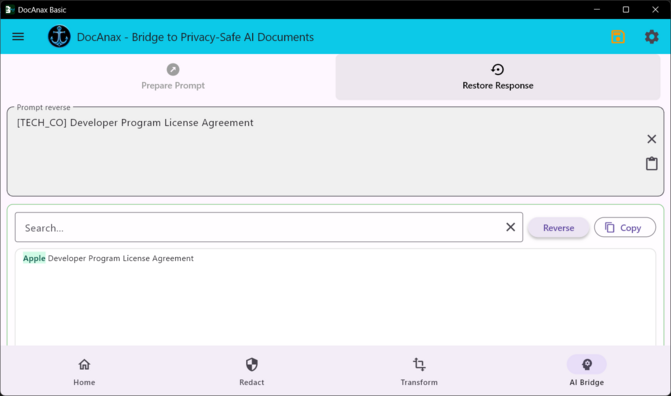
8. Restoring AI Responses
When an AI-generated response contains protected placeholders, the response can be pasted back into DocAnax.
For example:
AI response:

[CLIENT] has a high priority because
[CO_1_CONTACT] should be contacted immediately.
DocAnax can restore the corresponding terms according to the applicable rules:
Orange Inc. has a high priority because
0233556688 should be contacted immediately.
This allows AI-generated results to return to the original business context and remain easier for the user to understand and use.
9. General Workflow
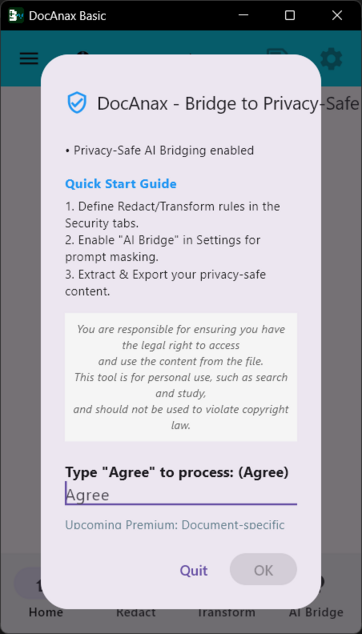
- Launch DocAnax: Adjust the application window size as needed and select your preferred language in the first-launch dialog.
- Accept the User Agreement: On the first launch, enter
Agreeto continue. This dialog normally appears only during the first launch.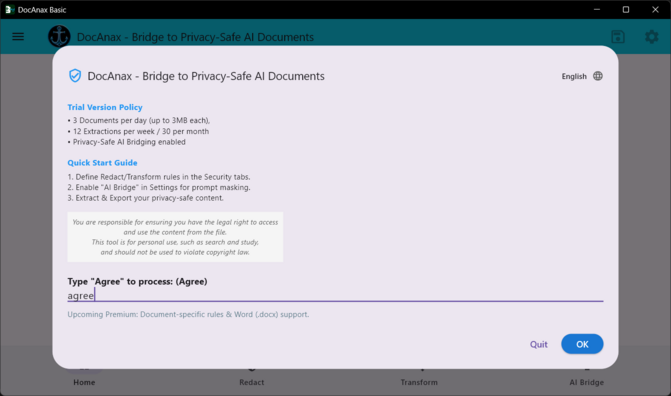
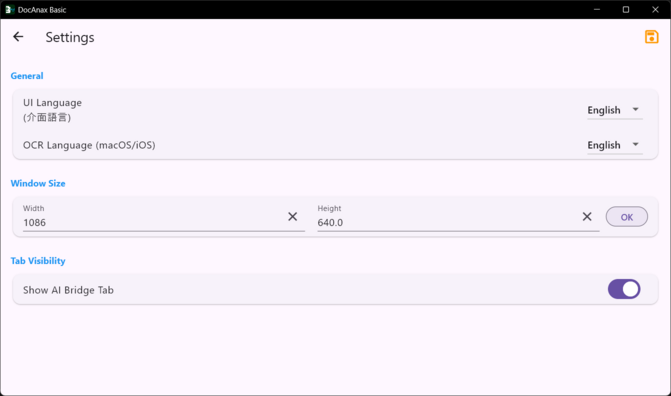
- Open Settings: Use the Settings icon in the upper-right corner to open the Settings page.
- Configure AI Bridge: If you plan to use AI Bridge, enable it in Settings.
- Define Redaction Rules: Create rules for sensitive or confidential information that should be masked. Example:
Apple → [TECH_CO]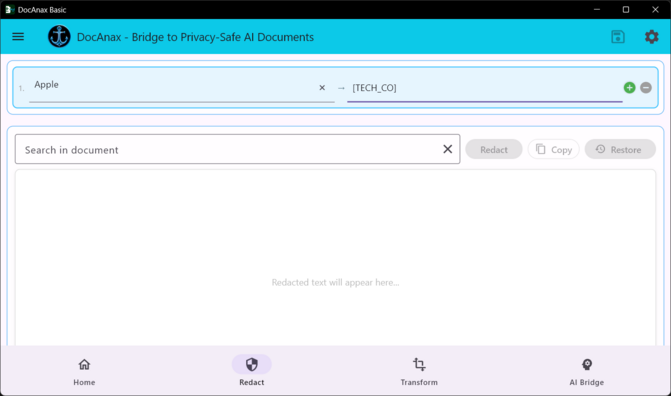
- Define Transformation Rules: Create rules for values that should be replaced when generating new document content. Example:
Program Agreement → Apple Program Agreement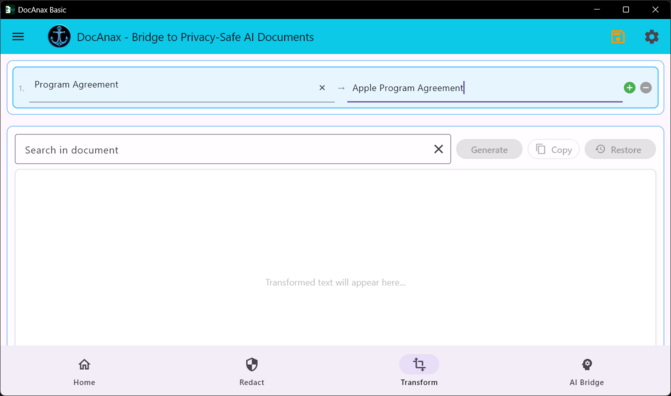
- Select a Document: Browse the local file system and select the document to be extracted, redacted, or transformed.
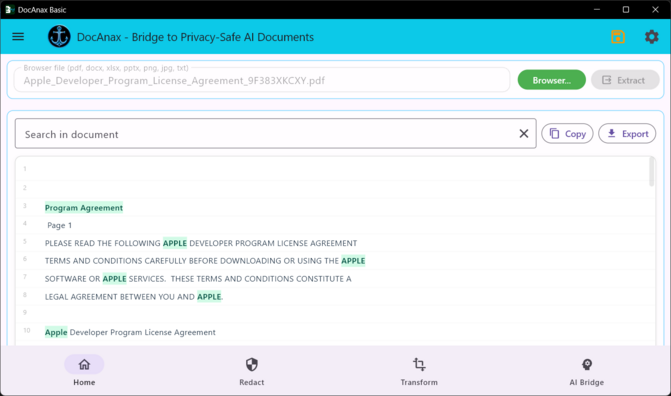
- Extract the Document: Go to the Home page and press Extract.
- Review the Results: Review the extracted content and verify the highlighted Redaction and Transformation matches.
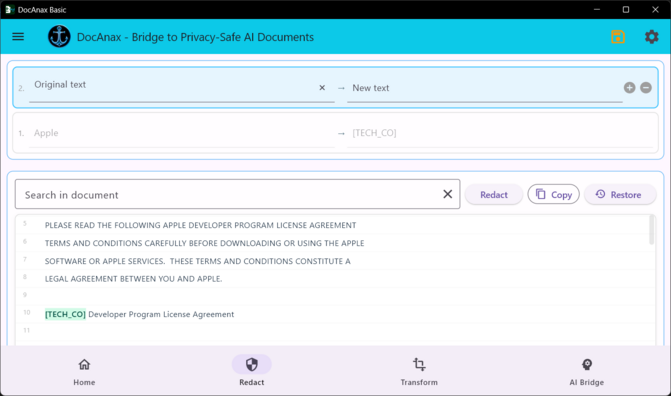
- Open the Redact Page: Go to the Redact page.
- Generate Redacted Content: Press the Redact button at the bottom of the interface.
- Verify Redaction: Review the highlighted redacted terms and confirm that sensitive information has been handled as intended.
- Share or Export Protected Content: Copy or export the redacted content and provide it to the intended recipient or AI service.
- Write the AI Prompt: Describe the task you want the AI service to perform. For example:
Please summarize this document and identify the major risks. - Generate a Privacy-Safe Prompt: Use the AI Bridge transformation function to convert the prompt into privacy-safe content. Copy the resulting prompt and send it to your preferred AI service.
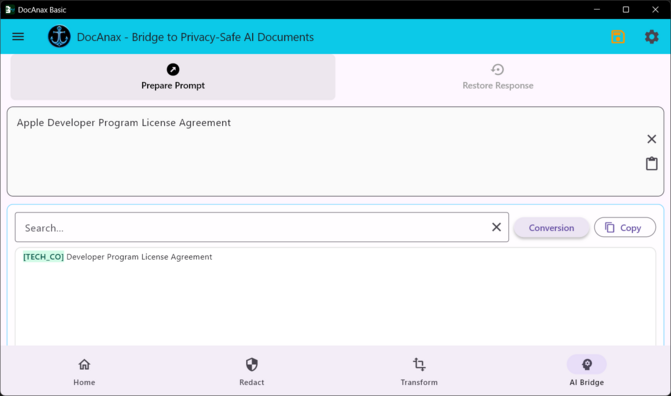
- Restore AI Insights: After receiving the AI response, paste it back into DocAnax. Restore the corresponding protected terms so that the result returns to its original business context.
10. Why Use AI Bridge?
A traditional AI document workflow may send original document content directly to an external AI service.
DocAnax introduces a local data-processing layer between the original information and the external AI service.
    Traditional Workflow

Document ─────────────────────→ AI
        Original Information


 DocAnax Workflow

Document
  ↓
Local Extraction
  ↓
Redaction / Transformation
  ↓
Privacy-Safe Data
  ↓
External AI
  ↓
AI Response
  ↓
Local Restoration
  ↓
Human-Readable Result
This architecture separates the responsibilities of local document processing and AI analysis.
DocAnax
- Extracts document content locally
- Applies user-defined rules
- Masks sensitive information
- Transforms document content
- Restores protected terms
AI Service
- Analyzes prepared information
- Generates summaries
- Provides analysis and insights
- Answers questions about supplied content
This hybrid approach allows users to combine deterministic local data processing with AI analysis while retaining greater control over sensitive information.
In some situations, it can also reduce the amount of sensitive information exposed to an external AI service and avoid sending information that is not required for the requested analysis.
11. Important Considerations
Redaction and Transformation are rule-based data-processing operations. Before sharing content with another party or an AI service, users should verify that the extraction and transformation results are correct.
When creating Redaction Rules, carefully verify that all relevant sensitive information is handled as intended.
Likewise, users should review AI-generated and restored results before using them in business, legal, financial, or other sensitive contexts.
DocAnax Philosophy
DocAnax is designed to place a local, controllable data-processing layer between your original information and external AI services.
Extract locally. Transform carefully. Redact before sharing. Use AI with greater control.
Download:
Apple App Store:
https://apps.apple.com/app/docanax/id6758036376
Microsoft Store:
https://apps.microsoft.com/store/detail/9P617C1NSG2V
DocAnax Demo Video
Youtube: